TUESDAY 3 MARCH · 08:12
How do people actually change careers at 31 without blowing up their whole life?
✦ A diary you already wrote ✦
Every question you've ever asked Claude, ChatGPT or Gemini — turned into a soft, sweet book of you. Flip the pages, print it, hug it.
♥ Read on this device. Never uploaded. No account.
A LOOK INSIDE ♥
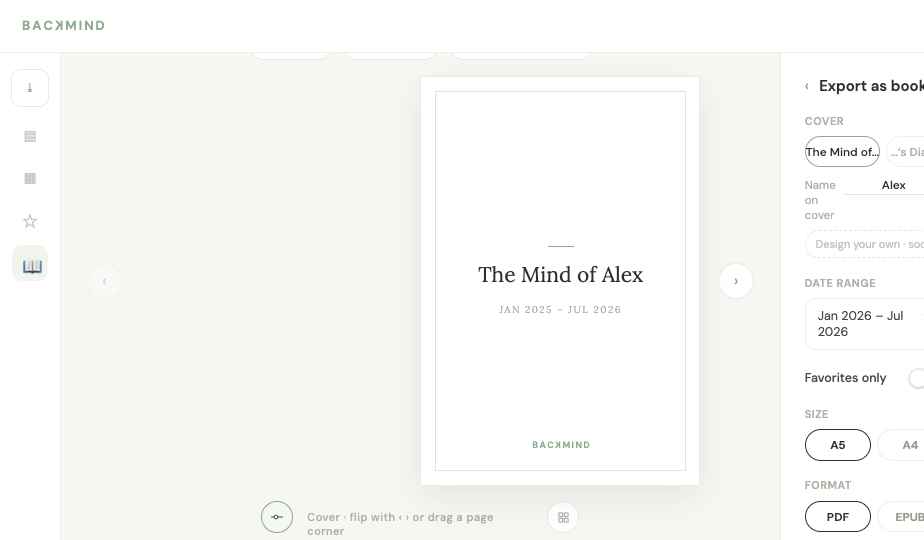
Drop a file, flip the pages, print the thing. Here's the book view — and every page of it runs inside your own browser.
 Open BackMind ♥
YOU'LL NEED ♥
Settings → Privacy → Export data
Settings → Data controls → Export
takeout.google.com → My Activity
Tea optional but recommended
HOW TO MAKE ♥
Zip or JSON, straight into the page. It's read right there in your browser — the file never leaves.
A feed, a calendar, your favorites — and a book you can flip through, then print or export.
THE HONEST BIT ♥
Every AI app lets you download your own chat history. A couple of minutes of clicking, once in a while — and it's the reason nothing ever has to be uploaded. Pick your app:
In Claude, click your initials in the bottom-left corner, then Settings → Privacy.
Claude packages every conversation you've ever had into one file.
It usually arrives within minutes. Drop the whole zip into BackMind — no unzipping needed!
♥ Takes about 2 minutes · the .zip arrives by email · works with conversations.json too
In ChatGPT, click your profile picture, then Settings → Data controls.
OpenAI prepares your archive and emails you a download link.
The link lasts 24 hours. The zip goes into BackMind exactly as it arrived.
♥ Takes about 2 minutes · the .zip arrives by email · only your active conversation branches are kept
Click Deselect all, then tick only My Activity.
Under My Activity: keep only Gemini Apps, then open "Multiple formats" and switch Activity records to JSON.
Google emails you a link when it's ready. Drop the Takeout zip straight into BackMind.
♥ Takes about 3 minutes · watch out: the format must be JSON, not HTML!
PRIVACY TIPS ♥
WHY YOU'LL LOVE IT ♥
QUESTIONS ♥
Nope! There's no server and no account. Your export is parsed inside your browser tab and entries live in your browser's own storage. Try it on airplane mode — everything still works.
Official exports from Claude and ChatGPT (the .zip or conversations.json), and Gemini via Google Takeout in JSON format. Zips or bare JSON, several files at once.
No — only your own prompts are kept. The diary is your questions, your plans, your 2 a.m. thoughts. The answers were never the interesting part.
Nothing bad! Duplicates are skipped automatically, and your favorites and edits are never clobbered. Import as often as you like — it just tops up the diary.
Yes — as a printable book (A5 or A4 PDF), an EPUB for your e-reader, or Markdown daily notes ready for Obsidian. Your data stays yours, going in and coming out.
Yes! Open it in any browser, or install it as an app on your phone and desktop. No account, no trial, no catch.
Export your chats, drop the file, start reading.